Every business has repetitive processes that consume valuable time. Employees manually update CRM records, transfer information between applications, prepare reports, respond to common customer questions, and manage routine follow-ups.
These activities can create operational bottlenecks, increase errors, and reduce overall productivity.
AI automation for business combines artificial intelligence with traditional software automation to streamline workflows, interpret information, and support business decisions. It allows organizations to automate repetitive tasks while improving how existing systems communicate and operate.
From customer support and lead management to document processing and reporting, AI-powered automation offers practical opportunities to improve business operations.
In this guide, we explore how AI automation works, its business applications, key benefits, implementation steps, and how organizations can identify the right automation opportunities.
1. What Is AI Automation for Business?
AI automation combines artificial intelligence with software workflows to reduce manual effort and improve business processes.
Traditional automation follows predefined rules. For example, when a customer submits a form, an automation system can create a CRM record and send a confirmation email.
AI extends this process by interpreting the customer's message, identifying the request type, summarizing important information, or recommending the next action.
For example, an AI-powered lead management workflow can analyze incoming inquiries, identify customer requirements, categorize leads, and prepare follow-up messages for sales representatives.
By combining AI capabilities with predictable business rules, organizations can build more flexible, efficient workflows.
2. How Does AI Automation Work?
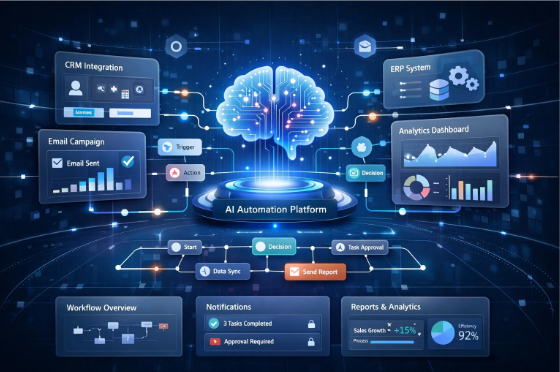
A typical AI automation workflow involves five stages:
Step 1: Trigger
A form submission, incoming email, new order, or scheduled event starts the automation workflow.
Step 2: AI Processing
Artificial intelligence classifies information, extracts details, summarizes documents, or interprets customer requests.
Step 3: Workflow Rules
The system applies business rules, validations, permissions, and routing conditions to determine what happens next.
Step 4: Connected Systems
Approved actions update CRM records, create tasks, send notifications, or prepare transactions through connected applications and APIs.
Step 5: Monitoring and Improvement
The organization tracks results, identifies errors, measures performance, and improves the workflow over time.
Some workflows require only an automation platform and an AI API, while more complex business requirements may need custom software development, database integrations, or AI agent orchestration.
3. Seven Business Processes You Can Improve With AI Automation
AI automation can support different departments by reducing repetitive work and improving information handling.
1. Lead Management and Follow-Ups
AI can classify incoming inquiries, summarize customer requirements, assign leads to sales representatives, and prepare personalized follow-up messages for review.
This helps sales teams organize opportunities and respond to potential customers more efficiently.
2. Customer Support Automation
AI automation can categorize support requests, retrieve relevant knowledge, summarize conversations, and suggest responses.
Unresolved or sensitive inquiries can be routed to the appropriate support representative.
3. Document Processing
Businesses can automate information extraction from invoices, applications, contracts and business forms.
AI can identify important fields and prepare structured records, while validation rules and human review help catch missing or incorrect information.
4. E-commerce Operations
AI-powered workflows can assist with order inquiries, product information, inventory reporting, return requests, and customer notifications.
5. Reporting and Data Analysis
AI can collect information from approved sources, prepare summaries, explain changes in business metrics, and generate draft business reports.
This helps teams access relevant insights without manually compiling information from multiple systems.
6. Recruitment and HR Operations
AI automation can organize application information, support interview scheduling, answer routine employee questions, and assist with administrative workflows.
Sensitive recruitment and employee-related decisions should remain under appropriate human oversight.
7. Software Development and IT Operations
AI can assist development teams with code reviews, test generation, incident summaries, technical documentation, and issue classification.
Human review, security checks, and established release procedures remain essential for critical production changes.
4. AI Automation vs. Traditional Workflow Automation
Traditional automation works well for predictable processes with fixed business rules. AI-enhanced automation is more useful when information needs to be interpreted, documents analyzed or customer messages understood.
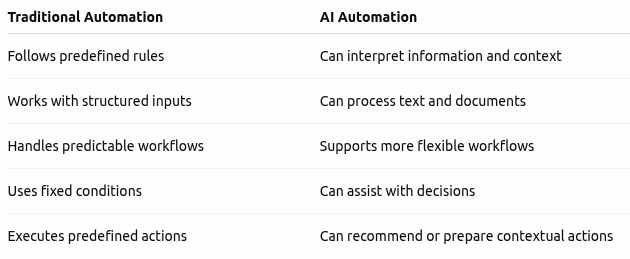
The two approaches work best together. Businesses should use deterministic software for critical calculations, permissions and limits while introducing AI where it provides meaningful value.
5. How to Identify the Right AI Automation Opportunities
Not every business process needs AI. Organizations should identify workflows where automation can deliver measurable improvements.
Follow these six steps:
- Identify repetitive work: Find tasks that consume time, create delays, or require employees to transfer information between systems.
- Measure the current process: Document processing time, transaction volume, error rates, and operational costs.
- Separate rules from judgment: Automate predictable steps directly and introduce AI where interpreting information provides an advantage.
- Check data and integrations: Review existing applications, API availability, data quality and privacy requirements.
- Start with a controlled pilot: Select one workflow, define success criteria, and test realistic scenarios before expanding.
- Monitor business outcomes: Track completion rates, processing time, errors, exceptions, and automation costs.
Starting with one well-defined workflow is generally more practical than attempting to automate an entire department immediately.
6. How to Calculate the Value of AI Automation
Businesses should evaluate AI automation through measurable operational outcomes rather than simply counting automated tasks.
Consider a team that spends 100 hours every month managing a repetitive workflow. If automation reduces this effort by 40%, the business frees up 40 working hours each month.
However, time saved does not automatically translate into direct financial savings. Its value depends on whether the additional capacity reduces costs, supports more work, or improves customer service.
When calculating automation ROI, consider:
- Initial development and integration costs.
- AI model and infrastructure expenses.
- Ongoing maintenance and monitoring.
- Human review and exception handling.
- Time saved and errors reduced.
- Business value of improved productivity and customer experience.
A clear baseline and regular performance measurement help businesses understand whether an automation project is delivering meaningful value.
7. Common AI Automation Mistakes to Avoid
AI automation projects can struggle when organizations automate poorly understood processes or introduce technology without clear business objectives.
Common mistakes include excessive system permissions, poor data quality, overlooking unusual scenarios, ignoring integration requirements, and failing to involve employees in workflow planning.
A reliable implementation needs clear ownership, documented processes, appropriate access controls, failure recovery, and human intervention when necessary.
Frequently Asked Questions About AI Automation
1. What is AI automation in business?
AI automation combines artificial intelligence with software workflows to automate tasks, interpret information, and improve business processes.
2. What are common examples of AI automation?
Common examples include lead management, customer support, document processing, HR administration, e-commerce operations, and automated reporting.
3. How does AI automation improve productivity?
It reduces repetitive manual work, speeds up information processing, and helps employees focus on higher-value responsibilities.
4. What is the difference between AI automation and traditional automation?
Traditional automation follows predefined rules, while AI automation can interpret unstructured information and support more flexible workflows.
5. Can AI automation integrate with existing business software?
Yes. AI workflows can connect with CRM platforms, databases, e-commerce systems, and other applications through APIs and integrations.
6. How should a business start implementing AI automation?
Start with one repetitive business process, measure its current performance, identify suitable AI opportunities, and test a controlled automation workflow.
Conclusion: Transform Business Operations With AI Automation
AI automation helps businesses reduce repetitive work, improve operational efficiency, and make better use of existing software systems.
From customer support and lead management to document processing and reporting, intelligent workflows can create meaningful improvements when implemented around real business requirements.
However, successful AI automation is not about automating everything. It requires identifying the right processes, selecting the right technology, maintaining reliable integrations, and measuring business outcomes.
Vision Vivante helps businesses connect artificial intelligence, custom software, and existing applications to build intelligent workflows tailored to their operational needs.